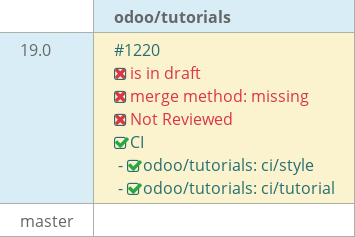
[ADD] estate: add real estate advertisement module#1220
[ADD] estate: add real estate advertisement module#1220times-odoo wants to merge 8 commits intoodoo:19.0from
Conversation


Add the base structure for the Estate module including
the manifest file and empty __init__.py.

The Estate module aims to provide a real estate advertisement
platform. This commit sets up the installable module foundation
with proper metadata before adding models and views.

Chapter-2

|
|
Add the EstateProperty model with essential fields for the
real estate advertisement module including text fields,
numeric fields, boolean fields and a selection field for
garden orientation.

Chapter-3
Add ir.model.access.csv in the security folder to define
access rights for the estate.property model. Grant read,
write, create and unlink permissions to base.group_user.

Update the manifest to include the security data file.

Chapter-4
 times-odoo
changed the title
times-odoo
changed the title
Add the views folder with action and menu definitions to
make the estate.property model accessible from the UI.
Link the menu item to the window action to allow users
to navigate to the properties list and form views.

Update the manifest to include the views data files.

Chapter-5
times-odoo
changed the title
Updated the date_availability field to use the static add()
method from fields.Date. This improves code cleanliness by
removing the need for a manual relativedelta import while
maintaining the 3-month offset logic.
Replaced the default list view with a structured <list> definition
to display key property details including title, postcode,
expected price, and availability date.

This ensures the user can see a high-level overview of properties
without opening individual records.

Chapter-6
Replaced the default form view with a structured XML definition.
The new layout uses <sheet> and <group> tags to organize property
information into logical sections, improving data entry and
readability.

Chapter-6

 mash-odoo
left a comment
mash-odoo
left a comment
mash-odoo
left a comment
There was a problem hiding this comment.
Hello!
Thank you for your work.
Here are some few questions and suggestions.
| class EstateProperty(models.Model): | ||
| _name = 'estate.property' | ||
| _description = "estate property used to buy and sell houses" | ||
| _log_access = False |
There was a problem hiding this comment.
_log_access(bool) is used to decide whether create the automatic(access log fields: create_uid, create_date, write_uid, write_date) fields or not.
|
|
||
| class EstateProperty(models.Model): | ||
| _name = 'estate.property' | ||
| _description = "estate property used to buy and sell houses" |
There was a problem hiding this comment.
Its the model’s informal name. You can see that displayed in Setting > Technical > Database Structure > Models > Description(column)
| copy=False | ||
| ) | ||
| expected_price = fields.Float(required=True) | ||
| selling_price = fields.Float(readonly=True, copy=False) |
There was a problem hiding this comment.
it prevents the field value to be copied over to the new record while duplicated
| @@ -0,0 +1,2 @@ | |||
| id,name,model_id:id,group_id:id,perm_read,perm_write,perm_create,perm_unlink | |||
| access_estate_property,access_estate_property,model_estate_property,base.group_user,1,1,1,1 No newline at end of file | |||
There was a problem hiding this comment.
Can you explain me what happens when you write this line?
There was a problem hiding this comment.
it creates a row in the ir_model_access table . what it does : it gives internal users( base.group_user ) access to estate property model with read, write, create and delete permissions
| @@ -0,0 +1,8 @@ | |||
| <?xml version="1.0" encoding="UTF-8" ?> | |||
| <odoo> | |||
| <menuitem id="estate_root_menu" name="Real Estate" web_icon="estate,static/description/icon.png"> | |||
There was a problem hiding this comment.
yes, it replaces the default icon of the app and shows this icon.

| 'category': 'Tutorials', | ||
| 'summary': 'The Real Estate Advertisement module', | ||
| 'description': 'Try installing the App', | ||
| 'depends': ['base'], |
There was a problem hiding this comment.
if the app is dependent on functions/features of other odoo modules, they must be defined in the depends field. it will load that modules before installing our app
| <group col='2'> | ||
| <group> | ||
| <field name='postcode'/> | ||
| <field name='date_availability' string='Available From'/> |
There was a problem hiding this comment.
When do we use view level string and field level string?
There was a problem hiding this comment.
We use the field-level string in model python file(estate_property.py) to set the global default label for the field. We use the view-level string in xml views (as seen on line 34 for date_availability) when we need to override that default for a specific view to provide better context to the user without changing the model's core definition.
| </field> | ||
| </record> | ||
|
|
||
| <record id="estate_property_action" model="ir.actions.act_window"> |
There was a problem hiding this comment.
A window action is used to create a link between our model and its views by specifying the res_model and view_mode
Implemented a custom search view for estate.property to enhance
record filtering. Added shortcuts for searching title and
postcode, along with a predefined filter for 'Available'
properties and a 'Group By' option for postcodes.

Chapter-6
3 participants


Add a new real estate advertisement module that allows
users to manage property listings with a complete UI.
The implementation covers:
text, numeric, boolean, date and selection fields
and group by options for better user experience
Chapter-2 to Chapter-6